Some information is manually collected for each session. This icludes the following:
- Attributes: specific landscape characteristics that describe a location
- Attractiveness: describes the characteristic of a location to attract animals. The scale goes from 1 (low attractivenes) to (3 - high attractiveness). This is influenced by the different attributes a location can posess.
- Positioning: decribes how well the set up of the cameratrap allows us to capture animals. The scale goes from 1 (bad positioning) to (3 - good positioning). The positioning is rated by amplitude (if the field of vision captures the locaiton well) and angle.
- Brand: the brand of the camera trap used for the session. This is important as different brands have different detection ranges and therefore may influence the number of animals captured. While this may be automatically extracted sometimes, there are frequently issues.
Input
this script needs access to the database, so check that you have the following information:
for database connection:
DB_USER = user name for the database with read and write access
DB_PASS = password for the database user
DB_PORT = 3306
DB_HOST = "localhost"
DB_NAME = "chinkoCamTrapData"
- ct_data = path to the organized data folder
- season_attribute_folder = path to folder where the attribute files are stored. The files to determine the arributes will be saved.
How it works
-
the script will check in the database if any session is missing information about the attributes, attractiveness, positioning and brand. If any session is missing information, it will print out the session name. These will then be used in the following steps
-
the script will generate a .csv file in the attribute folder named
date_month_year_missingAttributes.csvwhere the user can fill in the missing information. One line corresponds to one session. The columns are as follows and filled in automatically for the user if information exists in the database:- session_name: the name of the session, is filled in automatically
- attributes: the attributes of the location
- attractiveness: the attractiveness of the location, this does not need to be filled in manually as it is automatically calculated based on the attributes and positioning that are manually filled in.
- positioning: the positioning of the camera trap
- ct_brand: the brand of the camera trap
-
the script generates a .pdf of the same name where it chooses 9 pictures at random from the session. It adds a box on the right that lists all known information about the session. The user can then use this to fill in the missing information in the .csv file. The top lists a number which corresponds to the row in the .csv file (including header, starting from 1 - the first row with the session name is 2). The user can then fill in the missing information in the .csv file.
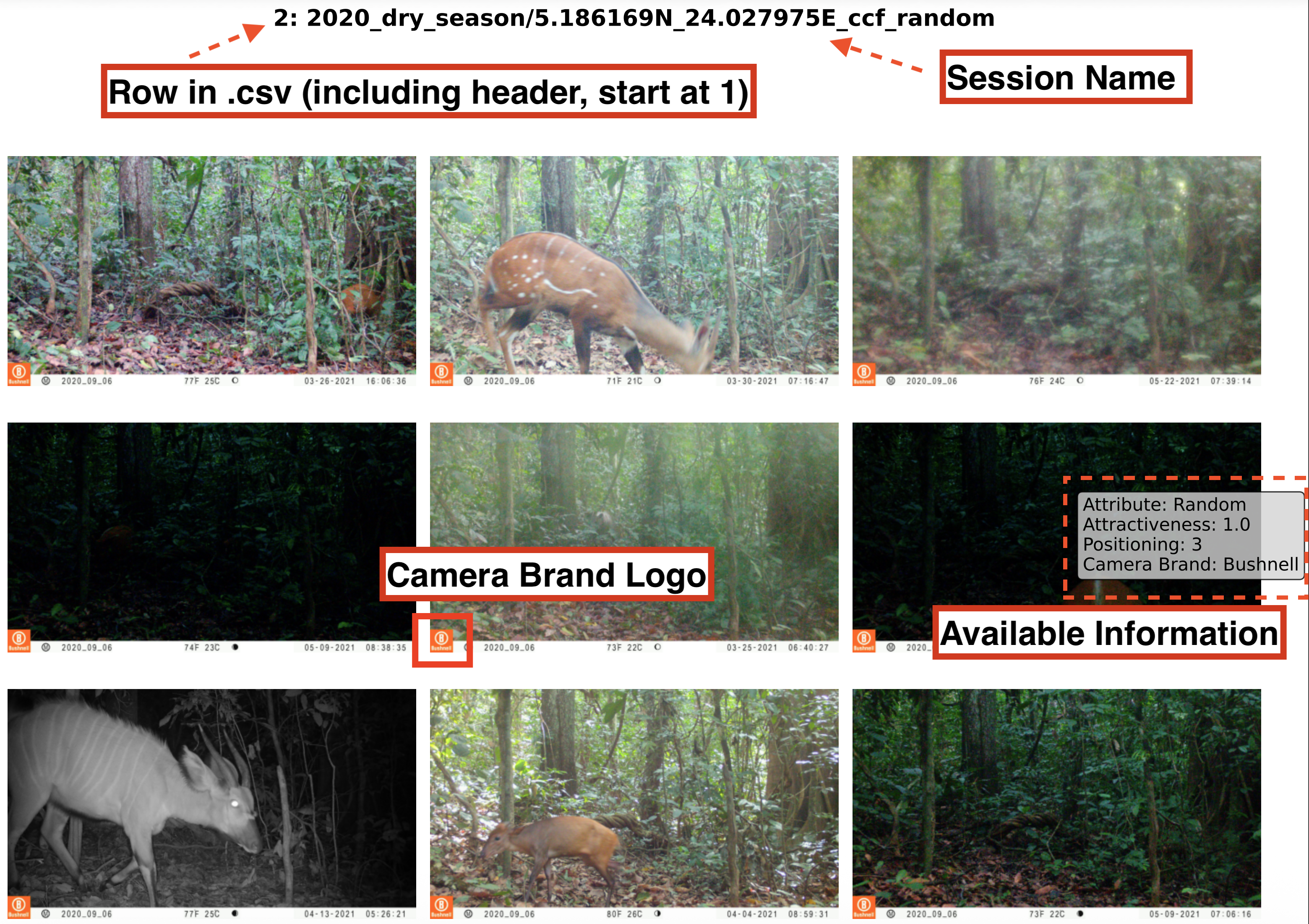
-
after filling in the missing information, the next cell in the script will fill in the attractiveness according to the chosen attributes and positioning. The user can then check if the attractiveness is correct and change it if needed. If positioning is 1, attractiveness is set to 1 as it is assumed that the camera trap is not set up properly and no relevant information can be extracted from the images. It will also print a warning if an attribute was written thats not in the attribute map, capitalization has to be identical.
-
the last cell in the script will then fill in the database with the information from the .csv file.
Guide to fill in the missing information
Attributes
Often, attributes are written in the session name, but not always. Reading the session name can provide clues about the attributes, but it is not always sufficient. If they are not, the user needs to check the images and determine the attributes. The following attributes are possible:
Attributed are specific landscape characteristics that describe a location
- Area of erosion (AOE): loose, rich soil area (usually brown)
- Road: usually has the imprint from the 2 car tyres
- Salt lick/saline: where animals go to lick salt; can be a natural saline or an artificial salt lick where teams supplement the soil with bags of salt. Often identifiable when animals look like they are eating dirt or licking the ground. Often, there are many animals present. If a salt slick is filled with water, it would still just be a salt lick not a water- or mudhole.
- River/Lake/Source/Waterhole: pointing to a water body of any kind. Sometimes hard to see but look for weird reflections in the image
- Animal path: a path animals use that is clearly not a road opened by the park (which usually has the imprint from the 2 car tyres)
- bonanza/meadow: green flat semi-open patch with fresh green grass, bonanza may also describe the placement of bait for predators by humans
- Mudhole: a hole or hollow place containing much mud that animals like to roll in. Look for half submerged animals in the mud or animals with mud on their body.
- Human path: a path used by humans, which may or may not be used by animals.
- Non applicable/random: when we can’t identify the attribute / there is none
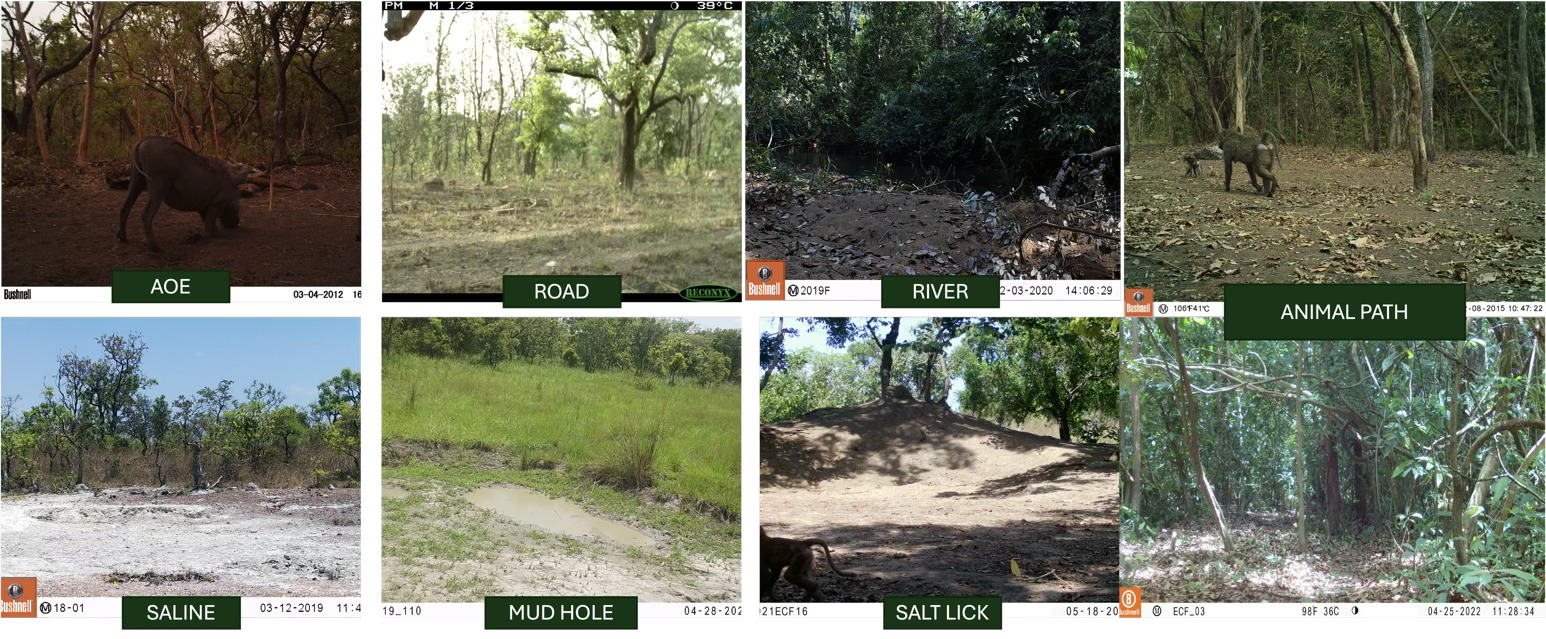
Generally, the attributes are not mutually exclusive. A location can have multiple attributes. For example, a location can be a road and a salt lick. In this case, both attributes should be added to the session. The attribute with the higher atttractiveness defines the attractiveness of the location. the attribute may have to be updated.
Attractiveness
Attractiveness describes the characteristic of a location to attract animals. The scale goes from 1 (low attractivenes) to (3 - high attractiveness). This is influenced by the different attributes a location can posess:
| Attribute | Scale |
|---|---|
| Salt lick/saline | 3 - high |
| Animal path | 3 - high |
| River/Lake/Source/Waterhole | 3 - high |
| Bonanza/meadow | 2 - medium |
| Area of erosion (AOE) | 2 - medium |
| Road | 2 - medium |
| Mudhole | 2 - medium |
| Human path | 2 - medium |
| Non applicable/ random | 1 - low |
| cameras with positioning = 1 | 1 - low |
Positioning
Positioning decribes how well the set up of the cameratrap allows us to capture animals. The scale goes from 1 (bad positioning) to (3 - good positioning). The positioning is rated by amplitude (if the field of vision captures the locaiton well) and angle.
3 – GOOD
- amplitude: ~60°; The angle captures the whole path, gets the full amplitude of the landscape in front
- height: knee height (set up), full body animal photos;
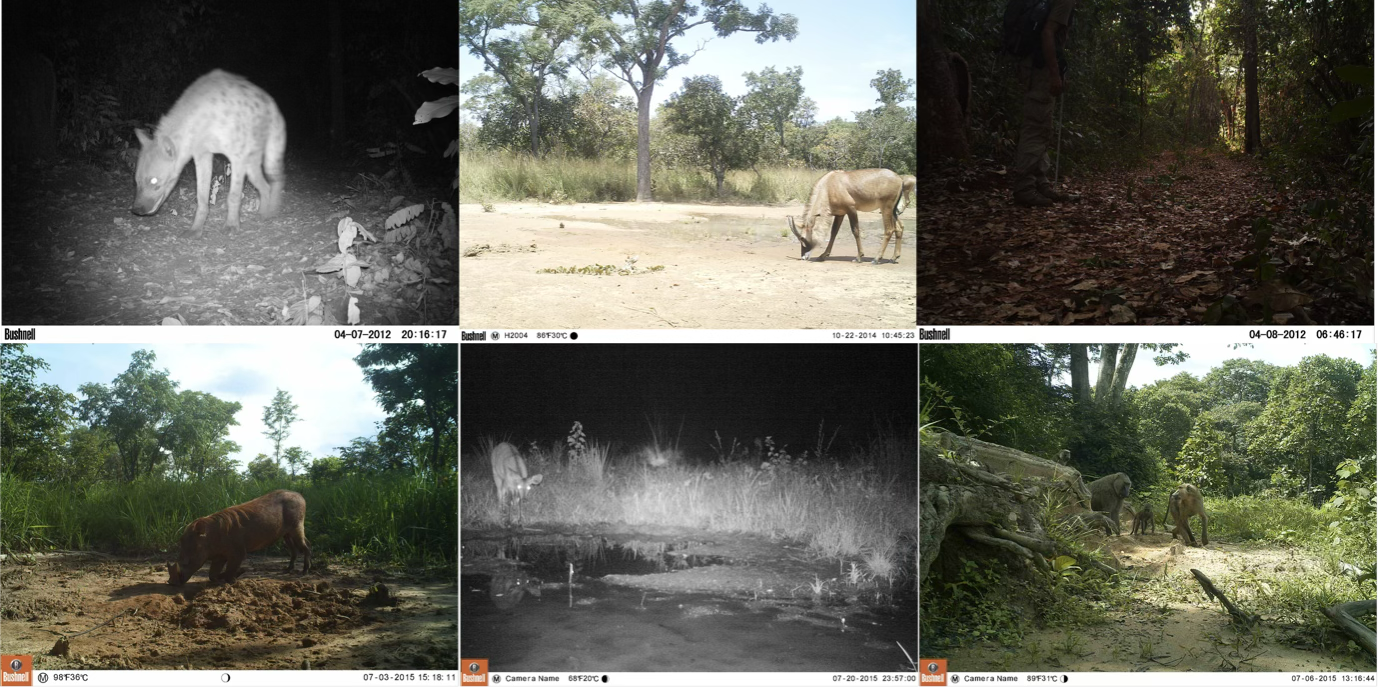
2 – MEDIUM
- amplitude: angled so location is only partially captured.
- height: too high, too low. Large animals may be cut off on top or small animals not captured.
camera images have one of these problems;
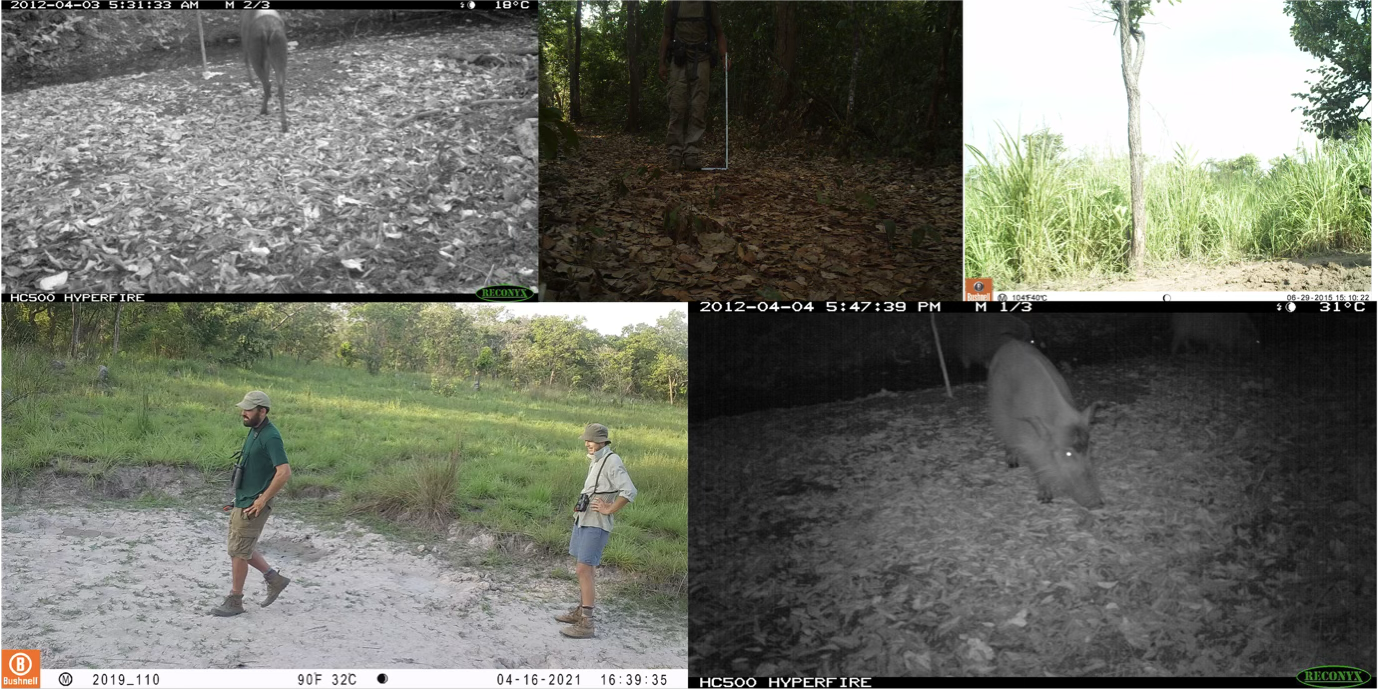
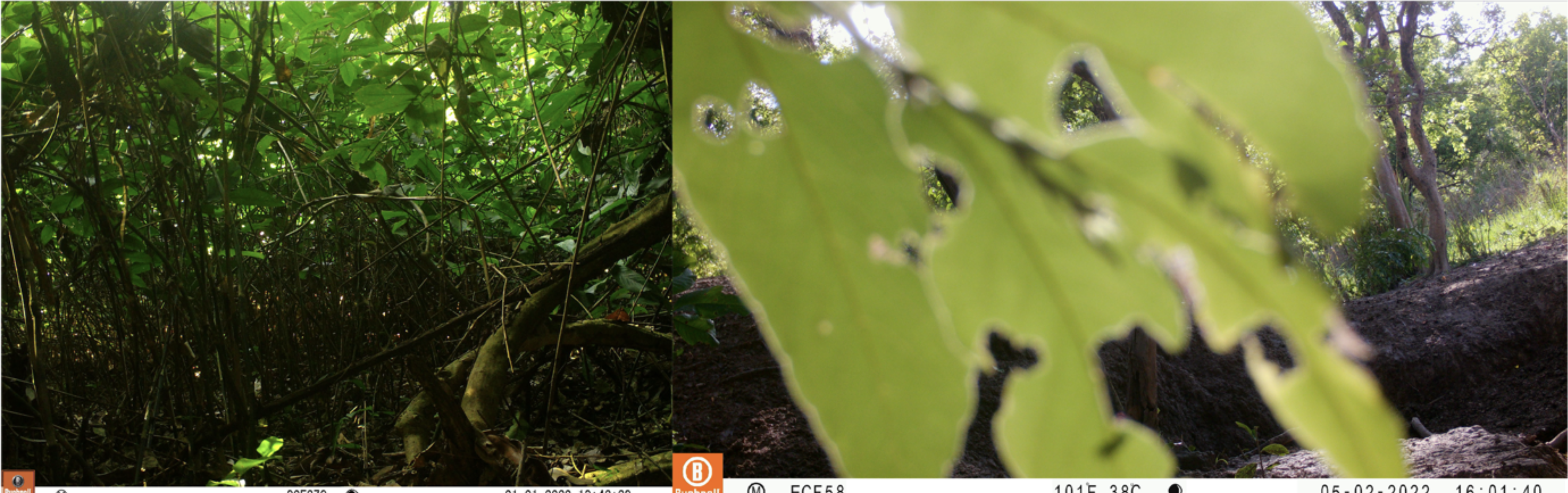
1 – BAD
- amplitude: location cannot be really be seen [eg: short distance to vegetation in front];
- height: too high, too low [eg: test set up pictures points at someone’s face and not their lower body]; Large animals may be cut off on top or small animals not captured.
- camera is pointing at the sky or pointing at the floor.
Camera has several issues and due to positioning passing animals are unlikely to be captured.
Additional Issues
Sometimes, there are camera issues which may impact monitoring. These are not strictly positioning issues but have the same impact as positioning and should therefore be reflected in that rating.
Issues could be:
- fog: sometimes there is fog for a very long time that drastically reduces vision / makes images blurry
- dirt on camera: similar as for vegetation, the dirt obscures vision
- lighting issue: the camera lighting is off (always way too dark or flash strongly overexposes)
what rating to give based on these cases depends on how much they obstruct vision. the general guode is that the session gets a 2-MEDIUM if less that half of the image is obstructed & animals can still be relatively reliably identified. It gets a rating 1-BAD if half or more of the image is obscured and its very difficult to impossible to identifiy species.
Rating Issues
If issues only apply to some of the images within a session and strongly change the attractiveness and positioning rating, then the session should be split into several session. Each "Subsession" should have images that have consistent ratings throughout.
Cases where this should be done are:
- Animal hits the camera and view is changed: Its likely that the amplitude and the attribute of the camera images changes.
- Night images are non-identifiable: if there is no flash or strong overflashing, night images may be impossible to classify. This could for example strongly alter activity pattern predictions. So either night images are removed and effort is limited to the hours with daylight, or each day and night is its own session with own ratings.
- etc...